Showing posts with label bittorrent. Show all posts

Thursday, March 15, 2007

how to increase your share ratio in torrent sites.

I have found a very intresting and user friendly program for making a good ratio in torrent site.
the software is greedytorrent.The torrent site such as bitme,elbitz,demonoid,desitorrents and every site which need invite to register.always ban their user if they have a share ratio less than 0.5%.Now with the introduction of this software their will be banning of user for share ratio.

GreedyTorrent was developed in C++ using wxWidgets 2.6.3 library http://www.wxWidgets.org), to make porting to different platforms easier in the future. It was compiled using MinGW+MSYS and the installation package was created using Inno Setup

GreedyTorrent is implemented as a proxy for the BitTorrent tracker protocol. Once installed, it sits in the system tray and waits for the BitTorrent client server to make a request to the torrent tracker. Once the BitTorrent client server is connected and attempts to report the ploaded quantity, GreedyTorrent modifies the upload ratio to report the results according to your predetermined preferences
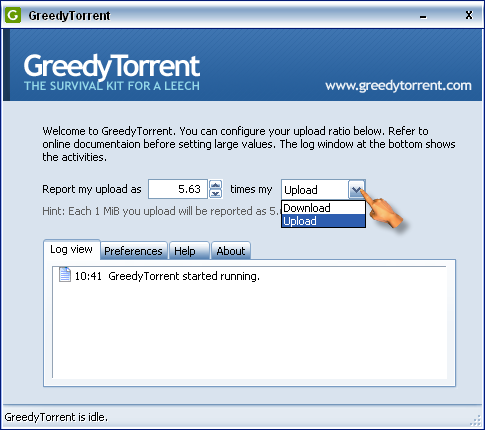
GreedyTorrent has the following features:
  • GreedyTorrent is set-once-and-forget type software. No need of configuring it each time you queue a torrent file to download.
  • No complicated options to configure. The default installation of GreedyTorrent is configured to provide you five times actual upload, enough for the survival of a normal ADSL user. There is no need to manually find the hash values or to set tracker URLs, it takes care of them automatically. GreedyTorrent was developed with the beginner user in mind, with an easy to use interface.
  • GreedyTorrent generates no additional traffic. It does not run or emulate an "extra torrent client", and thus does not waste your precious bandwidth.
  • You can continue to use your favorite BitTorrent client, no need to switch to another BitTorrent client to use GreedyTorrent.
downloadneed to speed up bittorrent client click here

Wednesday, March 14, 2007

Increase download speed of a BitTorrent client

Some users of the BitTorrent client report experiencing slow downloads when sharing P2P files. This is most likely to occur on computers behind a home router or software firewall.

Being behind firewalls, the BitTorrent client may block incoming Bit Torrent network connections. Given the load balancing and "swarming" nature of the BitTorrent network, clients unable to take incoming requests for uploads will naturally be allowed less bandwidth for downloads.

To solve this problem, consider the following:

  • When a user starts a BitTorrent client, the client sets up a network resource called a "port" to allow other Bit Torrent clients to connect ot it. Each port possesses a unique number called the "TCP port number."

  • A BitTorrent client normally associates the TCP port number 6881. However, if this port is busy for some reason, the client will instead try successively higher ports (6882, 6883, and so on up to a limit of 6999). In order for outside BitTorrent clients to reach this one, they must be able to connect to the correct port.

  • When connecting to another BitTorrent client, the requesting client will first try port 6881, then 6882, and so on. However, if the computer is on a firewalled network, the incoming request may not reach these ports. On the other hand, if these requests succeed, the accepting client will be able to download faster.

  • Firewalls can block nearly all of the ports used by P2P clients. To ensure the BitTorrent ports are made available to requesting clients, a home router or firewall can be manually configured to accept them. Most home routers possess a feature called "Port Range Forwarding" to do this. This feature allows the administer to tell the firewall where traffic for a given port number should be directed.

  • For BitTorrent, many home users set up port forwarding on the TCP range 6881-6889. These ports must be directed to the computer running the BitTorrent client. If more than one computer on the network may run BitTorrent, a different range such as 6890-6899 or 6990-6999 can be used for each. Remember that BitTorrent uses ports in the 6881-6999 only.

  • Many people don't realize that Windows XP computers include the built in Windows Firewall. If port forwarding is set up on a home router, but Windows Firewall is running on the BitTorrent client computer, incoming requests may still fail to reach the client. Ensure the Windows Firewall is either disabled or is set up to allow the appropriate BitTorrent ports to pass through. The same recommendation applies to other software firewalls.

  • On home networks without a router, the software firewall (Windows Firewall, ZoneAlarm, or other) must be set up to provide the equivalent forwarding or pass-through capability as needed.
via computernetwork